Blog Moved

Blog Moved to: www.techwn.com

Wednesday, 15 August 2012

Facebook adds a New Event for Timeline, 'Expecting a Baby'


Facebook has introduced a new Timeline feature called 'Expecting a Baby”, which enables users to share time when they are going to become a mother or father. The new life event for Timeline allows expectant parents to share their baby's due date and also choose gender, whether it is a boy or a girl.
Moreover, Facebook users can also include details who is other parent, location and a story about the birth. There is also an option to add photos. Your announcements will appear in the Celebrations section, located in the upper-right corner where birthdays appear.
“Life Events are easy and expressive ways to mark significant moments in your life such as getting married, buying a house or traveling to new places. If you choose to, you can now share that you are expecting a baby with your friends on Facebook,” says the social networking website in a blog post
.

To use the new Timeline feature, go to your Timeline. Click Life Event from the sharing tool. Choose Family and relationships and select expecting a baby. Add the details you want to publish and click Save.

Similarly, to share that you just became a parent, follow the same steps, except choose new child in the family and relationships section. The announcement, as said before, will appear in the Celebrations section.
Facebook recently had released a similar feature for users who want to share news of their engagement or wedding. The social networking company earlier this month launched a new campaign called Facebook Stories, a new website where users can tell their stories on how the social networking site has been helpful in their real life. To know more about the Facebook Stories,keep visiting ..
What do you think of the new 'Expecting a Baby' feature? Let us know in the comments section below:

Saturday, 11 August 2012

Intel is going to launch wireless charging for ultrabooks & smartphones?


Intel is reportedly gearing up to launch a wireless charging system for both ultrabooks and smartphones next year,
The chipmaker hopes to integrate the technology into devices by the second half of 2013.
Intel’s system will coax power from an ultrabook and wirelessly deliver it to a smartphone via a transmitter.
According to the source, rival manufacturers are planning to follow suit: “In addition to Intel, there are already several smartphone players and telecom carriers aggressively developing wireless charging technology.
“Japan-based NTT Docomo and Sharp both previously launched smartphones with wireless charging functions that meet the Wireless Power Consortium's (WPS) Qi standard, but high prices are still creating barriers that distance consumers.”

Good Luck to Intel.....

Altering search by Google results to control piracy


 Google is altering its search results to de-emphasise the websites of repeat copyright offenders and make it easier to find legitimate providers of music, movies and other content.
The move is a peace offering to Hollywood and the music recording labels. This year, Google joined other Silicon Valley heavyweights to help kill legislation that would have given government and content creators more power to shut down foreign websites that promote piracy.
The Motion Picture Association of America issued a lukewarm response, saying it was "optimistic" the change would help steer consumers away from piracy.
"We will be watching this development closely - the devil is always in the details," MPAA senior executive president Michael O'Leary said in a statement.
Next week, Google will start using "valid copyright removal notices" to rank its search results, according to a Friday blog post by Google's senior vice president of engineering, Amit Singhal.
Google typically ranks websites based on how many other sites link to them, on the belief that sites that get more links are more trustworthy and useful. But Google also regularly tweaks its formulae to reflect special circumstances.
In this case, sites with high numbers of copyright-removal notices may get bumped down in rankings. In effect, that will help users find legitimate sources of content without removing any pages from its results completely. Google did not elaborate on what it considers to be valid notices.
Google's icy relationship with content creators has thawed slightly.
Last month, Google said it would offer a $50-per-month TV package over a super-fast fiber network in a Kansas City test bed. The package would offer mainstream channels including Viacom's Nickelodeon.
Google, which is based in Mountain View, California, also sells movies and music through its Google Play store on mobile devices that use its Android operating system.
But a $1 billion copyright lawsuit filed by Viacom against Google's YouTube in 2007 was re-instated by a federal appeals court in April after a lower court threw it out.
And last week, court papers showed that the Authors Guild is demanding Google pay $750 for each of the 20 million books it has scanned in a 7-year-old case.

Friday, 10 August 2012

How To Rename My computer and Recycle Bin on Windows 7


Well, on windows xp, we used to hack windows or go the hard way of registry – editing to rename my computer icon or recybin name but on windows 7, it is as easy as renaming anything else.
Just right-click on computer icon or recycle bin icon and select rename – enter the new name – You are done.
You can even rename computer menu in start menu the same way.
Thanks


Wednesday, 8 August 2012

How to change name of recycle bin in Windows XP


Recycle Bin is the place that all your deleted files and folders goes after you delete them from the original purpose. To safeguard the files or folders just in case you accidentally remove them, the files and folders are not been cleaned and swiped off completely, instead been moved to recycle bin, so that they can be recovered when needed. However, what if you don’t like the name of recycle bin, and prefer name such as rubbish bin, garbage bin, unwanted file place, useless file corner and etc?

To change the name of recycle bin or rename recycle bin in Windows XP, Windows 2000, Windows NT, Windows Me, Windows 98 or Windows 95, just edit a registry value:
  1. Open registry editor by going to Start -> Run, and execute regedit.
  2. Navigate to the following registry branch:
    HKEY_CLASSES_ROOT\CLSID\{645FF040-5081-101B-9F08-00AA002F954E}\
  3. On the right pane, locate the registry key of LocalizedString.
  4. Double click on LocalizedString or right click on LocalizedString and select Modify to modify the registry value.
  5. You should see the default value of “@%SystemRoot%\system32\SHELL32.dll,-8964″. Delete or remove the default value and key in your desired new recycle bin’s name in text, e.g. “Garbage Bin” (without quote).
  6. Refresh your desktop or Windows Explorer by pressing F5. You will see the new ‘recycle bin’ name.
  7. Optionally, you can also modify the text of InfoTip, commonly known as tooltip what display certain help tip, guide or description about Recycle Bin when the mouse is hovering on Recycle Bin icon on desktop. The default text is “Contains files and folders that you have deleted.” Simply double click on InfoTip, or right click on InfoTip and select Modify to change the text of the info tip.
  8. The default value is “@%SystemRoot%\system32\SHELL32.dll,-22915″, simply change it to another description that you want the tooltip to be.
  9. Refresh the desktop to make it effective.


Windows 8 users will get 'Do Not Track' options for IE10


Microsoft today said users of Windows 8 will be able to change the default setting for the DNT (Do Not Track) privacy feature in Internet Explorer 10 (IE10) when they first run the new operating system.
DNT signals whether a user wants online advertisers and websites to track his or her movements. All five major browsers -- Chrome, Firefox, Internet Explorer, Opera, and Safari -- can send a DNT signal.

In May, Microsoft announced that DNT would be switched on by default for IE10. That stance has not changed -- if users take no action, the feature will be enabled -- but today the company's chief privacy officer noted that customers can modify the setting if they want.
Setting choices after installation but before software runs is often described as a "first-run" option.
"DNT will be enabled in the 'Express Settings' portion of the Windows 8 set-up experience," Brendon Lynch, Microsoft's chief privacy officer, said in a Tuesday post to a company blog. "There, customers will also be given a 'Customize' option, allowing them to easily switch DNT off if they'd like."
Like earlier editions of the operating system, Windows 8 will offer users alternatives when they first run the software. The Express option accepts the defaults Microsoft has set, including DNT, and is assumed if the user does nothing but proceed with the setup. Customize lets users modify the default settings before running Windows 8 for the first time. "By using the Customize approach, users will be able to independently turn on and off a number of settings, including the setting for the DNT signal," Lynch promised.
When the user allows Express to complete the Windows 8 setup, they will see what Lynch called a "prominent notice" that tells them IE10 will have DNT switched on.
"Microsoft keeps Do Not Track by default in Win[dows] 8 and IE10, but makes it a first-run option. Hard to argue with that," said Jonathan Mayer in a Tuesday tweet.
Mayer, a researcher at Stanford's CIS (Center for Internet and Society), is one of two Stanford students who devised the HTTP header concept used by browsers to signal a user's DNT decision. He is also active in discussions by the W3C (Worldwide Web Consortium) standards-setting group to finalize DNT's implementation.
In the past, rivals have complained about how Microsoft structures its Express settings, and have claimed that few users select the Customize alternative.
Lynch said feedback drove Microsoft to spell out how IE10 will handle DNT.
"Since [May], we have conducted additional consumer research that confirmed strong support for our 'consumer-privacy-first' approach to DNT," claimed Lynch. "We have also discussed our point of view with many interested parties, who want to learn more about how our customers will first experience and control the DNT setting in IE."
It's clear there are "interested parties" in Microsoft's unilateral decision to turn on DNT.


Monday, 6 August 2012

Windows 8 : Download Release Preview


Saturday, 4 August 2012

London Olympic stars Of India

Vijay Kumar, Saina Nahwal & Gagan Narang are the three who won madels in London Olympic for India and make us proud..
Gagan Narang wins Bronze medal in 10M Air rifle

Vijay Kumar wins Silver medal in 25 Rpid Fire Pistol
Saina Nehwal wins Bronze medal in badminton


 TechinAct.com & the entire nation is SO proud of your tremendous feat!


Monday, 16 January 2012

Generate instant traffic from article writing


In the previous topic we discussed about Forum Marketing, Now lets have a look at Article Writing.
Article Writing plays a great role in generating traffic to your website/blog/business portal. If you are good at this, you can drive huge traffic to your website. Choose a top level article directory website, Choose your article type or category and start posting good articles.
For example, If you have a food recipe website, you should post your articles at:
http://articles.submityourarticle.com/Food_&_Drink
So first choose your website related article directory and then start writing good articles. Remember, The people will take interest in your website if and only if you write good articles.
You can get good amount of traffic and subscribers using this techniques, So start now and Good luck.

Sunday, 15 January 2012

Forum Marketing - Generate traffic to your website


In the previous article: The 10 perfect ways to get traffic to your website, we discussed website traffic generating techniques and as I promised I am going to explain all the techniques in detail, So we are starting with Forum Marketing now.
Forum marketing is a good technique to get traffic to your website/blog. Using forums you can make many connections and can send too much traffic to your website.
Using forum marketing, you can drive a lot of traffic to your website/blog/business portal as it's an effective technique/strategy to build traffic.
The only thing you need to know is to be successful or good at forum marketing in order to get benefit. Here are some key factors of a good forum marketing:

  • First thing is to post high quality or valuable contents which means no spam or crap posting.
  • Become a premium or trusted member so that the people may concern about what you posting.
  • Always make good signature line that attracts visitors, Example:

How to get tons of traffic to your website? www.techinact.com 

  • Do not use so many links in your signature it may confuse the readers/visitors.
  • Once again, people will look and browse your signature if and only if your post content is good enough.


Here are the top 10 list of internet forums that you should join and contribue:

  1. www.warriorforum.com
  2. www.forums.digitalpoint.com
  3. www.ewealth.com
  4. www.v7n.com/forums
  5. www.intenetmarketingforums.net
  6. www.forum.abestweb.com
  7. www.namepros.com
  8. www.webmaster-talk.com
  9. www.whydowork.com/forums
  10. www.dnforum.com 

Remember, These forums are for Inetnet Marketing, You may need other type of forums according to your business/content type. So pick the forums wisely and start posting good contents. Good Luck!

Tuesday, 15 November 2011

The 10 perfect ways to get traffic to your website


In this article, I’m going to share with you 10 perfect strategies for getting thousands of visitors to
your website each and every week.

They include:

1. Article Marketing
2. Forum Posting
3. Ebook Syndication
4. Video Marketing
5. Viral Pushes
6. Ad Swaps
7. Paid Advertising
8. Profile Making
9. Directory Submission
10. Blog Commenting

In further articles, We'll dive into the details of these strategies. :)

Thursday, 10 November 2011

Variables That Usually Affect Search Engine Ranks


This list includes most of the variables known to affect search engine ranks. One should understand that some of these variables are more important than others.
Variables that affect ranks in a positive way (these factors probably will not change over time, these
are some of the most important variables):
Keywords in your copy.
Link popularity.
Keywords in the title tag.
Listings in directories.


Variables that affect ranks in a negative way (these factors probably will not change over
time):

Spamming by using the same word or phrase several times in your title, meta tags, or text.
Spamming by putting words or phrases into your meta tags or title that have nothing to do
with the actual content people see on your web page.
Using text the same color as the background.
Using tiny text (font size "-1" or smaller) as a way to cram keywords into a page.
Linking out to sites that have nothing to do with the focus or niche of your site.
Linking out to link farms or free-for-all (FFA) link pages. (Sites that contain pages just for the
purpose of exchanging links with other sites without concern for content. Generally link farms
or FFA link pages have thousands of links and the links are added by means of a program not
a human.)
Links coming in from link farms or FFA link pages.


Variables that have been thought to affect ranks positively in the past (these factors may
change over time depending on the way the algorithm is programmed):

Keywords in the domain name
Bolding keywords, e.g. <b>WiseVIN</b>
Using keywords in heading tags, e.g. <H4>WiseVIN</H4>
Keywords closest to the top of the page.
Keywords in the description tag.
Keywords in the keywords tag.
Keywords in the names of linked pages and in the linked words, 
e.g. <a href="http://wisevin.blogspot.com/">WiseVIN : An Entrepreneur</a>.
Keywords in alt tags.
Keywords as names of images, e.g. <img src="wisevin.gif alt="wisevin">.
Getting listings in Pay-Per-Click search engines like Google Adwords or Overture.
Since keywords are so important in SEO it is heavily recommended you get yourself a solid keyword tool such as Keyword Elite . Not only will this save time, effort, and lots of guess work, but it will
greatly increase your SEO efforts.

Saturday, 5 November 2011

Search Engine Popular Terms


Alt Tag: The alternative text that the browser displays when the surfer does not want
to or cannot see the pictures present in a web page. Using alt tags containing
keywords can improve the search engine ranking of the page for those keywords.

Click Popularity: A measure of the relevance of sites obtained by noting which sites
are clicked on most and how much time users spend in each site.

Cloaking: The process by which your site can display different pages under different
circumstances. It is primarily used to show an optimized page to the search engines
and a different page to humans. Most search engines will penalize a site if they
discover that it is using cloaking.

Comment Tag: The text present within the tags in a web page. While most search
engines will ignore the text within the Comment Tags, some, like Excite, will index
the text present within them.


Directory: A site containing links to other sites which are organized into various
categories. Examples of directories are Yahoo!, Open Directory, LookSmart, NBCi
etc.

Doorway Page : A page which has been specially created in order to get a high ranking
in the search engines. Also called gateway page, bridge page, entry page etc.

Dynamic Content : Information in web pages which changes automatically, based on
database or user information. Search engines will index dynamic content in the same
way as static content unless the URL includes a ? mark. However, if the URL does
include a ? mark, many search engines will ignore the URL.

Frames : An HTML technique allowing web site designers to display two or more
pages in the same browser window. Many search engines do not index framed web
pages properly - they only index the text present in the NOFRAMES tag. Unless a
web page which uses frames contains relevant content in the NOFRAMES tag, it is
unlikely to get a high ranking in those search engines.


Hallway Page : A page containing links to various doorway pages.

Heading Tags : A paragraph style that is displayed in a large, bold typeface. Having
text containing keywords in the Heading Tags can improve the search engine ranking
of a page for those keywords.

Hidden Text : Text that is visible to the search engines but is invisible to humans. It is
mainly accomplished by using text in the same color as the background color of the
page. It is primarily used for the purpose of including extra keywords in the page
without distorting the aesthetics of the page. Most search engines penalize web sites
which use such hidden text.

Image Map : An image containing one or more invisible regions which are linked to
other pages. If the image map is defined as a separate file, the search engines may not
be able to index the pages to which that image map links. The way out is to have text
hyperlinks to those pages in addition to the links from the image map. However,
image maps defined within the same web page will generally not prevent search
engines from indexing the other pages.

JavaScript : A scripting language commonly used in web pages. Most search engines
are unable to index these scripts properly.

Keyword : A word or phrase that you type in when you are searching for information
in the search engines.

Keyword Frequency : Denotes how often a keyword appears in a page or in an area of
a page. In general, higher the number of times a keyword appears in a page, higher its
search engine ranking. However, repeating a keyword too often in a page can lead to
that page being penalized for spamming.

Keyword Prominence : Denotes how close to the start of an area of a page that a
keyword appears. In general, having the keyword closer to the start of an area will
lead to an improvement in the search engine ranking of a page.

Keyword Weight : Denotes the number of times a keyword appears in a page as a
percentage of all the other words in the page. In general, higher the weight of a
particular keyword in a page, higher will be the search engine ranking of the page for
that keyword. However, repeating a keyword too often in order to increase its weight
can cause the page to be penalized by the search engines.

Link Popularity : The number of sites which link to a particular site. Many search
engines use link popularity as a factor in determining the search engine ranking of a
web site.

Meta Description Tag : The tag present in the header of a web page which is used to
provide a short description of the contents of the page. Some search engines will
display the text present in the Meta Description Tag when the page appears in the
results of a search.

Tuesday, 1 November 2011

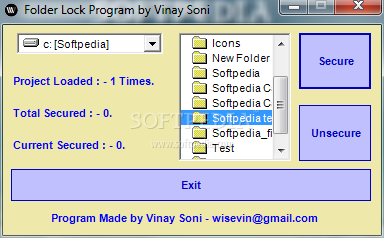
Secure your folders using Folder Lock Program

Folder Lock 1.0

Description:

Folder Lock is a small and useful utility that can help you restrict access to the directories you want. Now your folders will become inaccessible to unauthorized users.
You can password protect a folder and the folder will be encrypted.

Softpedia Award: Folder Lock 100% Clean 


Forwarding Email Account [Gmail Explained]

Do you want to use secondary email address while hiding your personal email account? or Do you want to connect your multiple email account to single account?
Here is how it can be done:
Email forwarding is an option provided by your email provider like Yahoo mail, Gmail, Hotmail etc. You can forward your multiple email accounts to a single private account to get all emails delivered to your private account.

Forwarding Email in Gmail:
Suppose you have two email IDs Public & Private and you want to forward all incoming emails from public id to the private id.
1. Sign in your public email id.
2. Click on the Options icon at the top right corner in your browser window (it will take you to the options page)

3. Now, under the settings page, click on the Forwarding option.
4. Click add a forwarding address and enter your private email.
5. That's all, Now all incoming emails which is sent to your public email account will be forwarded to your private email account.

Saturday, 29 October 2011

phpBB adding "AddThis" Social sharing button

Sharing on social networking sites are very good and traffic generating. There are many plugins that adds social sharing button in wordpress but its a bit hard to add social sharing buttons in phpBB bulletin board. Well, Here everything explained how to add these buttons to your forums.

1. Login to your hosting account and open file manager.
2. Navigate to Forums > Styles > Your current Style > Template > Viewtopic_body.html
3. Open viewtopicbody.html and edit it.
4. Press CTRL+F and find the code below:

</span><br />{postrow.SIGNATURE}</div>
5. Add the code below right after the above code:
<!-- AddThis Button BEGIN -->
<div class="addthis_toolbox addthis_default_style ">
<a class="addthis_button_facebook_like" fb:like:layout="button_count"></a>
<a class="addthis_button_tweet"></a>
<a class="addthis_button_google_plusone" g:plusone:size="medium"></a>
<a class="addthis_counter addthis_pill_style"></a>
</div>
<script type="text/javascript" src="http://s7.addthis.com/js/250/addthis_widget.js#pubid=xa-4eac6d5c6431ec66"></script>
<!-- AddThis Button END --> 

6. Login to your phpBB admin account and Purge the Cache under General tab.

That's all, You are done!

See the result below:


If you have questions, please let me know. :)


Wednesday, 26 October 2011

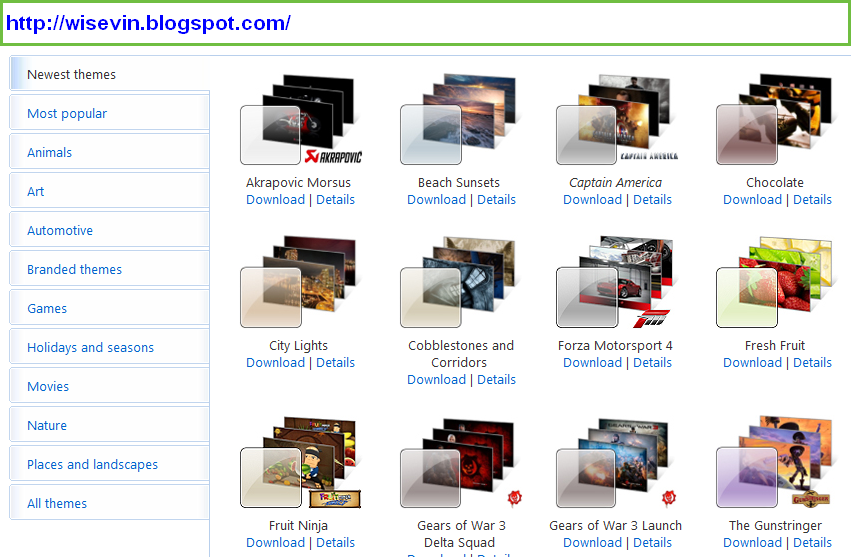
Windows 7 Themes: New look to your Windows 7

Are you bored with the current look of your windows 7? Don't worry Windows provides you many of customized themes to give a new look to your operating system.
Using these themes you can add brilliant graphics and other accessories that will enhance your windows graphics and looks. There are many sites which offers free themes for windows 7.
You can customize these themes according to your wish and can give your PC a genuine look.
So Why don't you try Windows 7 Themes?


Go to the official Windows 7 Themes Page
Alternatively: Windows7Theme

Tuesday, 25 October 2011

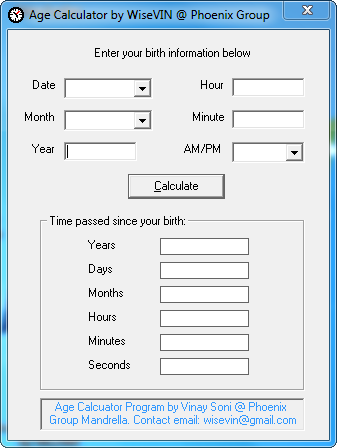
Age calculator in Visual Basic 6

Age calculator is a simple program to calculate the accurate age by given date of birth. You don't need to write today's date because it is automatically grabbed from your PC time and date.
The Age calculator gives the accurate age even in seconds that How many seconds you have spent on this earth LOL!
You can contact me if you want this project with synopsis and source code.


Download this: Age Calculator on Sourceforge 
Download this from Softpedia: Age Calculator - Softpedia

AdRorator Control in ASP.NET


The AdRoatator control displays a sequence of images, known as advertisements, on a Web page. The sequence in which the images appear can be predefined on random in nature. These advertisements, which all Internet users are familiar with, are image files in GIF, JPEG, or other formats that the user can click to navigate to the advertiser's website.
Inheritance hierarchy of Adrotator class:
System.Object
  System.Web.UI.Control
        System.Web.UI.Webcontrols.WebControl
             System.Web.UI.WebControls.BaseDataBoundControl
                 System.Web.UI.WebControls.DataBoundControl
                     System.Web.UI.WebControls.AdRotator

Sunday, 23 October 2011

Happy Diwali to all you surfers!


Now, Its Diwali season, The most important festival in india. I won't be telling you the whole story behind this festival because you must be knowing about Diwali already IF you are celebrating it. Those who doesn't know can use google.
Wish you all a very happy and prosperous Diwali. May you be blessed ! :)